Motivation
Last month we initialized a new project with Angular and Angular Material. As time goes on, I have noticed that some of my colleagues are often writing inline styles for margin and padding.
<div style="margin-top: 5px; margin-bottom: 5px">
  With inline style
</div>
Some of them (including me) are creating similar CSS classes for almost every component wherever needed.
.set-padding {
  padding: 10px 0;
}
.left-spacer {
  margin-left: 10px;
}
Then I realized that we are missing bootstrap-like margin and padding classes. One of my colleagues suggested using Tailwind CSS. However, as we are already using Angular Material for our component library, installing a CSS framework only for some spacing classes will be overkill for sure. So, I decided to write these classes on my own.
Bootstrap Classes: A Closer Look
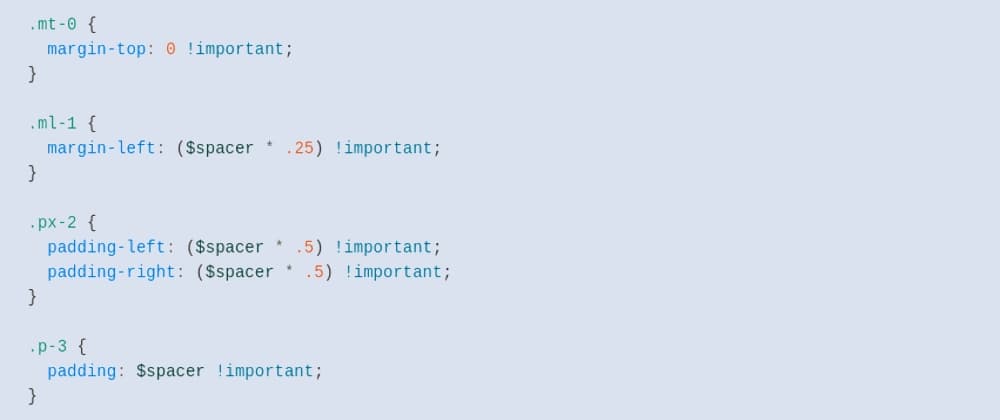
According to the documentation of Bootstrap 4 its spacing classes have the following format:
The classes are named using the format {property}{sides}-{size} for xs and {property}{sides}-{breakpoint}-{size} for sm, md, lg, and xl.
Where property is one of the:
Where sides is one of the:
t - for classes that set margin-top or padding-top
b - for classes that set margin-bottom or padding-bottom
l - for classes that set margin-left or padding-left
r - for classes that set margin-right or padding-right
x - for classes that set both *-left and *-right
y - for classes that set both *-top and *-bottom
blank - for classes that set a margin or padding on all 4 sides of the element
Where size is one of the:
0 - for classes that eliminate the margin or padding by setting it to 0
1 - (by default) for classes that set the margin or padding to $spacer * .25
2 - (by default) for classes that set the margin or padding to $spacer * .5
3 - (by default) for classes that set the margin or padding to $spacer
4 - (by default) for classes that set the margin or padding to $spacer * 1.5
5 - (by default) for classes that set the margin or padding to $spacer * 3
auto - for classes that set the margin to auto
Define Our Requirements
Our focus is to generate all the CSS classes of the format {property}{sides}-{size}.
For example:
m-0 to m-5 and m-auto
p-0 to p-5
mt-0, mb-0, ml-0, mr-0 to mt-5, mb-5, ml-5, mr-5 and mt-auto, mb-auto, ml-auto, mr-auto
pt-0, pb-0, pl-0, pr-0 to pt-5, pb-5, pl-5, pr-5
mx-0 to mx-5 and my-0 to my-5 and mx-auto, my-auto
px-0 to px-5 and py-0 to my-5
Notice, we are omitting {property}{sides}-{breakpoint}-{size} pattern, which is not in the scope of this article.
SASS Implementation
I am going to use SCSS syntax, you can also use the original SASS if you find that easier to use.
Let's create a new file _spaces.scss. The filename starts with _ because I want to make it a partial sass file. You can check the Sass guide if you do not know what a partial Sass file means.
Create a variable $spacer with the default value for space.
$spacer: 1rem !default;
Then create a sass:map with keys from 0 to 5 and auto and set the calculated value for each key.
$spacers: (
  0: 0,
  1: $spacer * 0.25,
  2: $spacer * 0.5,
  3: $spacer,
  4: $spacer * 1.5,
  5: $spacer * 3,
  auto: auto,
) !default;
Now, let's loop through the map and generate classes from m-0 to m-5 and m-auto.
@each $key, $value in $spacers {
.m-#{$key} {
margin: #{$value} !important;
}
}
We can also generate padding classes inside this loop. Let's generate classes from p-0 to p-5.
@each $key, $value in $spacers {
.m-#{$key} {
margin: #{$value} !important;
}
.p-#{$key} {
padding: #{$value} !important;
}
}
However, this code will also generate .p-auto { padding: auto !important; } which is incorrect. So, we need to exclude the auto key when generating .p-* classes.
@each $key, $value in $spacers {
.m-#{$key} {
margin: #{$value} !important;
}
@if $key != auto {
.p-#{$key} {
padding: #{$value} !important;
}
}
}
Till now, we have covered the following cases:
m-0 to m-5 and m-auto
p-0 to p-5
Let's focus on the next two cases:
mt-0, mb-0, ml-0, mr-0 to mt-5, mb-5, ml-5, mr-5 and mt-auto, mb-auto, ml-auto, mr-auto
pt-0, pb-0, pl-0, pr-0 to pt-5, pb-5, pl-5, pr-5
Now we need to generate classes that can target specific sides. Therefore create a sass:list containing all the sides.
$sides: (top, bottom, left, right);
For each key presents in the $spacers map we need to generate classes combining each direction/side. Therefore, we need a nested loop like this.
@each $key, $value in $spacers {
@each $side in $sides {
.m#{str-slice($side, 0, 1)}-#{$key} {
margin-#{$side}: #{$value} !important;
}
}
}
Same as before, we can generate padding classes (excluding auto key) inside this loop.
@each $key, $value in $spacers {
@each $side in $sides {
.m#{str-slice($side, 0, 1)}-#{$key} {
margin-#{$side}: #{$value} !important;
}
@if $key != auto {
.p#{str-slice($side, 0, 1)}-#{$key} {
padding-#{$side}: #{$value} !important;
}
}
}
}
Now we are only left with the following two cases to generate:
mx-0 to mx-5 and my-0 to my-5 and mx-auto, my-auto
px-0 to px-5 and py-0 to my-5
To generate classes for x and y axes let's create a new sass:list.
$axises: (x, y);
Same as before, for each key value present in $spacers combining each axis present in $axis list we need to generate classes. So, we need to use nested loops again.
@each $key, $value in $spacers {
@each $axis in $axises {
@if $axis == x {
.m#{$axis}-#{$key} {
margin-left: #{$value} !important;
margin-right: #{$value} !important;
}
@if $key != auto {
.p#{$axis}-#{$key} {
padding-left: #{$value} !important;
padding-right: #{$value} !important;
}
}
} @else if $axis == y {
.m#{$axis}-#{$key} {
margin-top: #{$value} !important;
margin-bottom: #{$value} !important;
}
@if $key != auto {
.p#{$axis}-#{$key} {
padding-top: #{$value} !important;
padding-bottom: #{$value} !important;
}
}
} @else {
@error "Unknown axis #{$axis}.";
}
}
}
Usage
If your project setup supports a Scss file, then you can import this file into your root style file using @use rule.
@use "./spaces";
If you need compiled css, then you can install SASS on your machine and use the following command to generate spaces.css file.
sass _spaces.scss spaces.css
After adding this, now we can use bootstrap-like CSS classes in our HTML code.
<div class="my-2 px-2">
  Styled with bootstrap like classes!
</div>
Conclusion
The complete source code is available here.
Thank you for reading. Your appreciation is my motivation!
Follow me on social media:
I'm open for a remote full-time/contract/freelance job for the position of Full-stack Software Engineer. If you are hiring, ping me at mazidmailbox@gmail.com